
Windows 10 / 11
Android 8+
Local only
MIT
Your per-app data usage,
kept for good.
Windows already counts how much data every app uses, but it keeps only the last 30 to 60 days, on the system drive, and a reset wipes it. Android keeps about 90 days. Data Usage Tracker copies both into a SQLite database on a drive that survives a reset, and shows the whole history in a dashboard that runs on your own machine.
How much history survives
12 months agotoday
Windows Settingsrolling 30 to 60 days
After a Windows resetthe database is on C:
nothing
Androidabout 90 days
Data Usage Trackereverything since it was installed
How it works
Windows PC hourly, Task Scheduler
- Shadow copy
esentutl /vsscopies the locked SRUM database. The only elevated step, run by its own task from an admin-only folder. - Replay journals
esentutl /rbrings the copy to a clean state so it can be read at all. - ParseSrumECmd turns SRUM's network table into CSV.
- IngestOnly new rows are appended. Running it twice inserts nothing the second time.
- Back upA consistent single-file copy is written beside the database.
Android phone every 6 hours, unmetered networks
- ReadThe reporter app asks
NetworkStatsManagerfor per-app traffic, which already resolves VPN double counting. - Name
PackageManagerturns each uid into packages and an app name, on the phone. - SendStraight to the dashboard on your LAN with a bearer token, or sealed end-to-end to an optional cloud inbox that works from any network.
SQLite on a second drive
live database + consistent backup; restore from the backup
Next.js dashboard
starts at logon, password-gated, on
127.0.0.1 unless you open it to your LAN
A tour of the dashboard
Scroll inside the frame. Every number in these is invented, loaded through the real collector code by npm run demo:data.
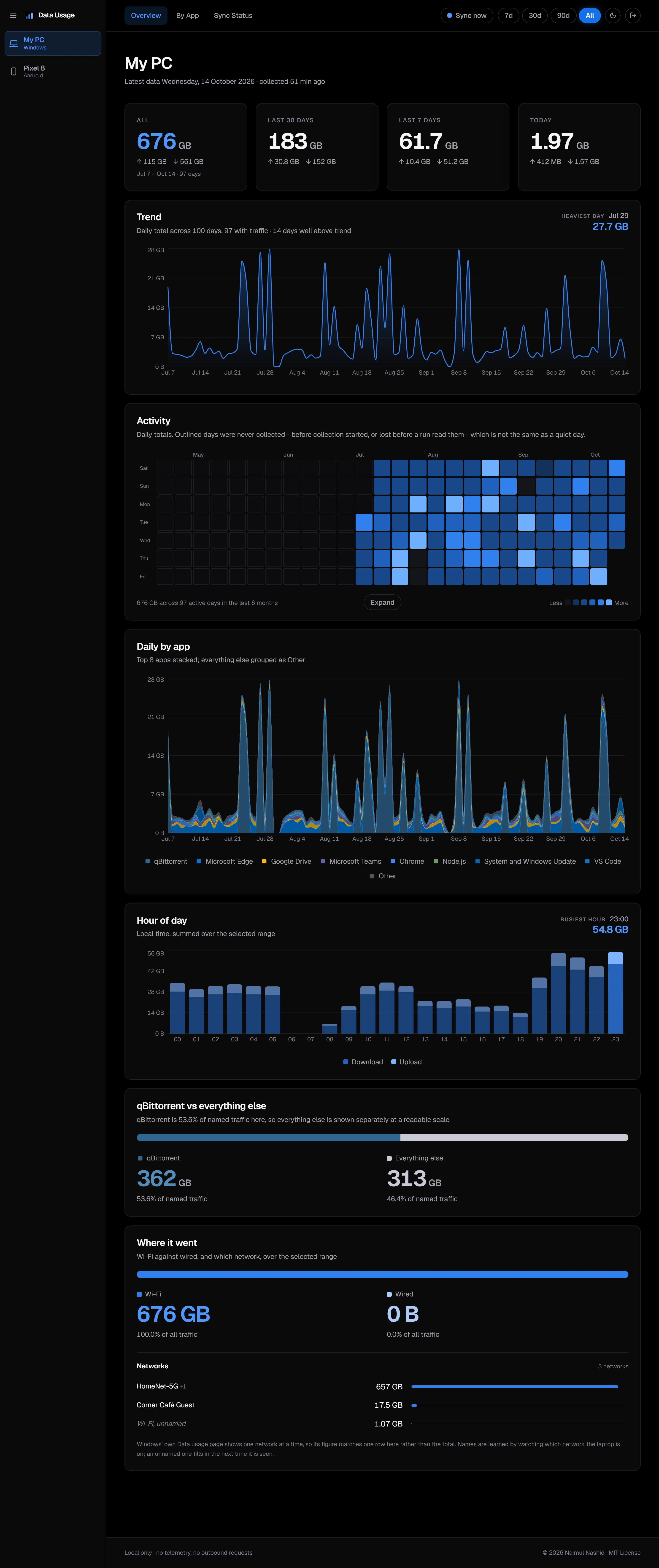
Every chart, live
Drawn from a fixed random seed, so every number is invented. The switch repaints them as the dashboard repaints each device.
Daily trend
OverviewA day above 2.5 times the average turns red, the only use of red outside a failed collector run. A day never collected is a break in the line, not a zero.
Activity heat map
Overview · expanded Activity pageOutlined cells were never collected, which is different from a quiet day. Expand opens every 26-week block since collection began, on one colour scale.
Daily usage by app
OverviewApps keep their brand colour wherever they appear, held inside a lightness band so near-white brands stay visible in both themes.
Hour of day
Overview · App detailLocal time, summed over the selected range. A phone reports in Android's two-hour buckets.
Top 10
By AppUpload is a tint of the app's colour, darker rather than lighter for pale brands so every bar stays visibly split. Each bar opens that app's detail page.
Daily usage, one app
App detailOne app against the rest
Laptop overview, optionalNaming one heavy app in config (splitApp) sets it apart, so everything else reads at its own scale. A laptop setting, so it shows in either mode.
Where it went
Overview · App detailThe laptop learns network names by watching which one it is on; a phone's come from a USB capture, and VPN traffic is shown apart, not guessed at.
The app table
By AppLists every app with enough activity for a detail page, expandable to every app ever seen. Click a header to sort, again to reverse.
Everything it does
Collecting on Windows
- Reads SRUM, the database behind Windows' own Data usage page, every hour, catching up after the PC was off.
- Only the shadow copy runs as Administrator, from a copy of one script in a folder only administrators can write, re-checked every run. The collector, parser and dashboard run as you.
- Replays SRUM's journals and, when that falls short, repairs a throwaway copy, so a snapshot taken mid-write still parses.
- Idempotent ingest: overlapping runs never double-count, and runs that find nothing new are normal.
- Refuses to put the database on
C:. - Learns Wi-Fi network names by noting the connected network every 15 minutes, and only names a network from an hour that had exactly one.
- Sync now in the top bar starts a collection on demand without elevating the server.
Android phones
- A reporter app with no third-party dependencies, for Android 8.0 and newer, released as a signed APK.
- Syncs every 6 hours on unmetered networks only, so it never spends the mobile data it measures. Both are adjustable.
- A status card answers "is it working?": green, amber after three days, red with the reason on a failure. An alert fires after a week without a sync.
- Optional cloud inbox: the phone posts to a fixed HTTPS address from any network, encrypted to a key only the PC holds. The inbox cannot read or forge an envelope.
- Any number of phones, each at its own URL, added with no code change.
- Per-Wi-Fi-network traffic over USB with
npm run android:ssid, since Android does not expose it to apps. npm run android:mergefolds a reinstalled phone's old history into its new id.
Reading the dashboard
- Overview, By App, App detail and Sync Status for every device, plus an expanded Activity page.
- Date range chips (7d, 30d, 90d, All) live in the URL, so every view is a link you can bookmark.
- A sidebar lists each device in its own accent: blue for the laptop, green for phones.
- App detail pages for any app with a shape worth seeing: at least 250 MB, or 10 MB spread over 7 days or more.
- Sync Status shows run history with rows read, new and duplicate, time taken and backup state, and warns loudly when the collector has stopped or keeps failing. A phone's page lists its uploads, including which came via the inbox.
- History tables page with Newest, Older, page numbers and a jump-to-page box.
npm run statsprints the same figures on the command line.
Names you recognise
- Raw SRUM identities become the names Windows shows: NT paths to program names, versioned install folders and Store package versions merged,
DoSvcandBITSshown as System and Windows Update. - Separate programs of one product are counted together, and the detail page lists every merged program and raw identity, so a merge is never silent.
- Rename any app, or give it your own colour with a picker or a hex code. Both are stored with the history and keep its logo and colour.
- Brand colours first, a generated palette second.
- Logos are dropped into a per-device folder by hand and picked up on the next page load, with no restart and nothing downloaded at runtime.
Numbers you can trust
- Validated against Windows' own Data usage page app by app, several within a fraction of a percent.
- Totals come from SRUM's per-interface total row and app figures from the app rows. Adding the two, which doubles everything, never happens.
- Traffic SRUM could not attribute to a program is reported, not hidden.
- Phone tethering is kept out of the phone's totals: if the laptop tethers off the phone, those bytes are already counted on the laptop.
- A day with no rows is zero inside collected history and "No data collected" outside it, never silently skipped.
- Why the headline will not match Windows' page is stated beside the per-network row that will.
Private and secure
- No cloud service, account or telemetry. The only optional outbound connection is the phones' encrypted inbox.
- Listens on
127.0.0.1unless you open it to your LAN. - A password of at least 12 characters gates every page and API route, and it fails closed: no password means no access.
- Wrong guesses are throttled, sessions are signed with a key derived from the password, and changing it signs out every device.
- State-changing requests must come from the dashboard's own origin; strict security headers on every response.
- The phone's token is separate from the password, so the password never leaves the PC.
Survives a reset
- The database and its consistent backup live on a second drive, safe to mirror to OneDrive or Google Drive.
npm run restoreputs the backup back, never the reverse, and clears stale WAL files first.- Re-running the setup scripts rebuilds the scheduled tasks for the new install.
npm run drillrehearses the whole recovery without resetting anything.- No native build step: SQLite is Node's built-in
node:sqlite, so a clean install years from now still works.
Pleasant to use
- Dark, light, or follow the system, remembered per browser. True-black dark theme.
- Installable as an app with its own window and taskbar icon. It caches only an "unreachable" page, never your data.
- Loading skeletons built from each page's own markup, so nothing moves when the data lands.
- Quick motion throughout: count-ups, charts drawing in, cards fading up.
- Every chart carries a text summary for screen readers; sortable headers work from the keyboard; text meets WCAG AA contrast.
- Phones get the full desktop layout, zoomed to fit.
- Starts hidden at logon, with no console window.
Try it without your data
npm run demo:datawrites 100 days of an invented PC and 90 of an invented phone through the real ingest code, including SRUM's awkward parts.npm run demo:shotsregenerates the README screenshots from it in headless Chrome, and refuses to capture any page showing a device that is not the demo's.npm run selftesttests the pipeline with no admin rights and no real data.
Built with
Next.js 15React 19TypeScript
Rechartsnode:sqliteGeist
PowerShell + Task SchedulerSrumECmd
Kotlin, no librariesSupabase Edge Function (optional)
Needs Windows 10 or 11, Administrator rights once, Node.js 22.16+, SrumECmd with a .NET runtime, and a second drive or partition.
For phones Android 8.0+, and adb to install the app.